
Dealer Intelligence Mobile1.025 - App Store
You'll be able to see results in few seconds.
Publisher Description
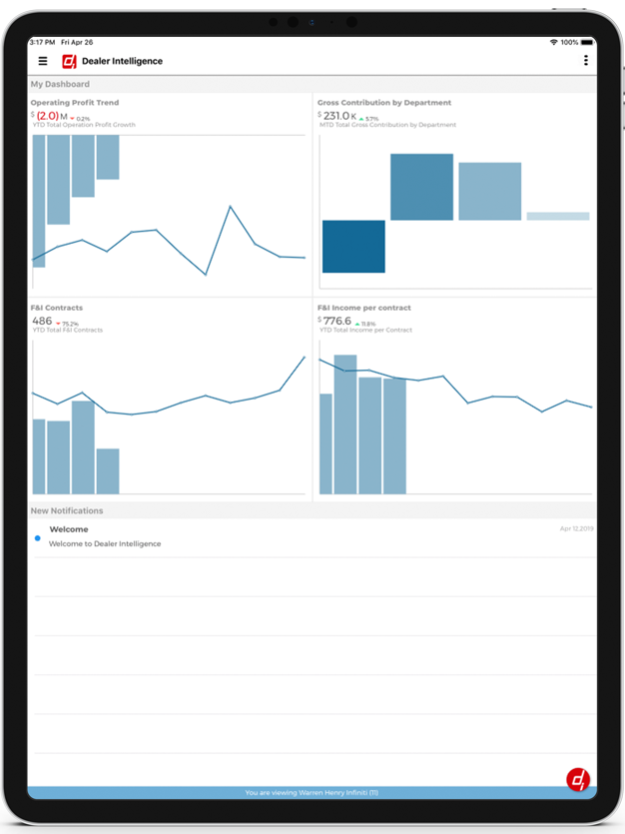
Dealer Intelligence (DI) is the industry’s most advanced business intelligence platform. DI helps dealership managers to gain insight in to every aspect of their business.
With DI’s unique mobile app, you can take those insights with you, making it easier than ever before to keep a pulse on your dealerships from anywhere in the world. Whether you're in the boardroom or catching a flight across the country, the same beautiful dashboards you use on your desktop are now just one tap away.
FEATURES
- Consolidated financials enterprise wide
- Enterprise reporting and analytics
- Dealership group or standalone store
- GL accounting and operational reporting
- Birds-eye view to transaction level detail
- Analyse expenses down to individual GL accounts
- Manage compensation plans
- Insight into performance drivers
- Single Source of Truth for every manage
- Easy to use. No PhD required
- Get fresh data with automatic updates
- Fully configurable user permissions
- Financial and Operational reporting, consolidated and department level
- GL-Drill down-analysis
- Customizable dashboard at all management levels
- Over 400 KPIs across every facet of your dealership
Mar 12, 2023
Version 1.025
- IOs 16.x Compatibility
- General Bug Fixes.
About Dealer Intelligence Mobile
The company that develops Dealer Intelligence Mobile is Dealer Intelligence LLC. The latest version released by its developer is 1.025.
To install Dealer Intelligence Mobile on your iOS device, just click the green Continue To App button above to start the installation process. The app is listed on our website since 2023-03-12 and was downloaded 0 times. We have already checked if the download link is safe, however for your own protection we recommend that you scan the downloaded app with your antivirus. Your antivirus may detect the Dealer Intelligence Mobile as malware if the download link is broken.
How to install Dealer Intelligence Mobile on your iOS device:
- Click on the Continue To App button on our website. This will redirect you to the App Store.
- Once the Dealer Intelligence Mobile is shown in the iTunes listing of your iOS device, you can start its download and installation. Tap on the GET button to the right of the app to start downloading it.
- If you are not logged-in the iOS appstore app, you'll be prompted for your your Apple ID and/or password.
- After Dealer Intelligence Mobile is downloaded, you'll see an INSTALL button to the right. Tap on it to start the actual installation of the iOS app.
- Once installation is finished you can tap on the OPEN button to start it. Its icon will also be added to your device home screen.
Program Details
System requirements
Download information
Pricing
Version History
version 1.025
posted on 2023-03-12
Mar 12, 2023
Version 1.025
- IOs 16.x Compatibility
- General Bug Fixes.
Disclaimer
Official App Store Link
We do not host Dealer Intelligence Mobile on our servers. We did not scan it for viruses, adware, spyware or other type of malware. This app is hosted by Apple and passed their terms and conditions to be listed there. We recommend caution when installing it.
The App Store link for Dealer Intelligence Mobile is provided to you by apps112.com without any warranties, representations or guarantees of any kind, so access it at your own risk.
If you have questions regarding this particular app contact the publisher directly. For questions about the functionalities of apps112.com contact us.
